
How to Price Antiques and Collectibles on eBay: What Sold Prices Really Tell You
Listing price and sold price are two completely different numbers on eBay. Here's how to find the real market data and use it to price your antiques right.
There are two prices on eBay for any antique: the price sellers are asking, and the price buyers are actually paying. These are rarely the same number. The first is hope; the second is data.
Thousands of sellers make the same mistake every week: they search for their item, see what others are asking, and price their listing accordingly. Then they wait. And wait. Because asking prices on eBay are largely meaningless — they represent what sellers wish they could get, not what the market will bear. Listings can sit at inflated prices for months and years without selling.
The only number that matters is the sold price: what a real buyer paid for a comparable item in the last 90 days. Learning to find and read this data correctly is the single most valuable pricing skill you can develop as an antique seller.
Table of Contents
- Why Sold Prices Are the Only Prices That Matter
- How to Find eBay Completed and Sold Listings — Step by Step
- How to Read the Results: What the Data Is Telling You
- Auction vs. Buy It Now: Which Format for Which Item?
- Beyond eBay: Cross-Referencing for Accuracy
- How to Set Your Starting Price
- Common Pricing Mistakes That Kill Sales
- FAQ
Why Sold Prices Are the Only Prices That Matter
Here's the problem with relying on active listings as your price reference: anyone can list anything at any price. An overpriced listing doesn't disappear — it just sits there, making it look like the market is higher than it is.
A sold listing represents a completed transaction: a real buyer, at a real moment, decided that price was worth paying. Multiply that by dozens of comparable transactions and you have an accurate market picture.
The reverse is equally important: unsold listings tell you what the market rejected. If you find ten completed listings for a type of Wedgwood plate priced at £120 and none of them sold — but two listings at £75 did sell — you now know exactly where the ceiling is.
Before you open eBay at all, get a baseline appraisal. Upload a photo to WorthLens.ai — the AI identifies your item and gives you a realistic price range instantly. This tells you whether you're dealing with a $30 item or a $300 one, which determines how much research time is justified and which platform is appropriate.
How to Find eBay Completed and Sold Listings — Step by Step
On desktop (eBay.com)
- Enter your search terms in the main search bar — be as specific as possible (maker name, pattern, model, material, size)
- Run the search to see active listings
- In the left-hand sidebar, scroll down to the "Show only" section
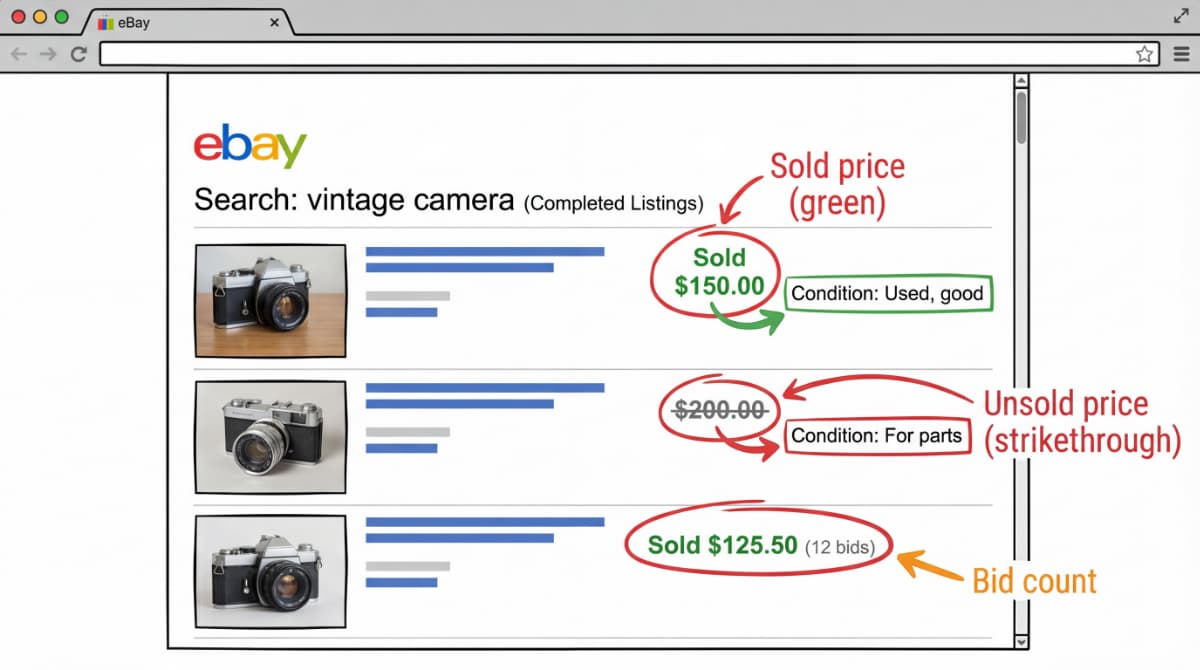
- Check "Sold items" to see only completed transactions with confirmed sale prices (shown in green)
- Optionally check "Completed items" instead — this shows both sold (green prices) and unsold (crossed-out prices) listings from the past 90 days
- Sort by "End date: Recent first" to see the most current market data
On the eBay mobile app
- Search for your item
- Tap the Filter button (top right)
- Scroll to the bottom of the filter menu
- Select "Sold listings" or "Completed listings"
- Apply filters and review results
You do not need to be a registered eBay seller to view sold listings. They're publicly accessible to anyone — including buyers doing pre-purchase research.
For data older than 90 days: Terapeak
eBay's standard sold listings only go back 90 days. For antiques with slow turnover — where comparable sales might only happen every few months — 90 days isn't always enough data.
Terapeak is eBay's own market research tool, built directly into the Seller Hub. It's free for most sellers and shows up to three years of historical sales data, including average sale prices, sell-through rates, and seasonal trends. Access it via: Seller Hub → Research → Terapeak Product Research.
For less common pieces, Terapeak often shows you the one or two comparable sales that happened 6–8 months ago that you'd otherwise miss entirely.
How to Read the Results: What the Data Is Telling You
Finding the results is the easy part. Reading them correctly is where most sellers go wrong.
Match condition carefully
The same item in different conditions can differ by 50–300% in price. When reviewing comps, look at:
- The photos in the listing (not just the title)
- The condition description ("Good," "Very Good," "Excellent," "Mint")
- Whether damage or restoration is mentioned
A Meissen figurine described as "minor chip to base" and one described as "perfect condition" are not comparable prices, even if the titles look identical.
Count the bids on auction results
On a completed auction listing, you can see how many bids were placed. Multiple bidders on a single item signal genuine demand — the final price was driven up competitively, and represents a real ceiling for that item at that moment. A single bid means the item sold at or near the starting price, with no competition.
For items that consistently attract 10+ bids, the auction format is working. For items that sell on one bid or not at all, the demand isn't there to generate competitive pricing.
Look at the full picture: sold vs. unsold ratio
If you search completed listings and see 15 listings — 3 sold, 12 unsold — that's a 20% sell-through rate. This market is oversupplied or overpriced. Adjust your expectations accordingly.
A 50%+ sell-through rate indicates healthy demand. You can price at the upper end of the range and expect reasonable turnover. A sub-20% sell-through rate means you need to price aggressively or consider a different platform.
Note keywords in successful titles
Study the titles of listings that sold. What specific words did those sellers use? Maker name? Pattern name? Period? Material? Condition word ("Antique," "Vintage," "Rare")? These keywords drive search traffic. If your listing uses different terminology, buyers searching for the right item won't find yours.
Auction vs. Buy It Now: Which Format for Which Item?
eBay offers three listing formats: auction, Buy It Now (fixed price), and Best Offer. Choosing the wrong format for your item type is one of the most common pricing mistakes antique sellers make.
Use auction format when:
- The item is rare and genuinely hard to find elsewhere
- You expect multiple interested buyers (high demand, low supply)
- You're not sure of the exact value and want the market to set the price
- The item could attract bidding wars — unusual antiques, desirable collectibles, items that come up infrequently
Risk: If demand is lower than expected, a low starting bid can result in a sale well below value. Always set a reserve price if the floor matters to you.
Use Buy It Now when:
- Comparable items have sold consistently at a known price range
- You want speed and certainty (no waiting 7 days to find out the final price)
- The item is not particularly rare — multiple similar examples exist
- You've done your comp research and know the price the market will pay
Tip: Add a Best Offer option alongside BIN — it lets motivated buyers make a private offer without public pressure, and you can accept, counter, or decline. This often closes sales that a BIN-only listing wouldn't.
A practical rule used by experienced antique sellers: start with auction for items you're unsure about, then list as BIN at the auction closing price if it doesn't sell on the first attempt. This uses the auction as a market test without permanently locking in a price.
Beyond eBay: Cross-Referencing for Accuracy
eBay sold data is powerful but not complete. For antiques, these additional sources add important context:
LiveAuctioneers and Invaluable — Aggregate auction results from thousands of auction houses worldwide. For ceramics, silver, furniture, and art, these databases often show results from specialist sales where informed buyers drove prices higher than eBay's general audience would.
Heritage Auctions price archive — Searchable historical auction results particularly strong for coins, comics, Americana, and jewelry. Free to search.
Kovels.com — Published price guides for hundreds of categories of antiques and collectibles. Useful for establishing a general range when eBay comp data is thin.
Worthpoint — A subscription service with over a billion historical sold prices across eBay, auction houses, and dealer databases. For serious sellers who deal in volume, the subscription pays for itself quickly.
Price guides (published books, websites) often lag the real market by 1–3 years. Use them for general category knowledge, not current pricing. Recent sold comps — eBay or auction results from the last 12 months — are always more accurate than a guide published in 2022.
How to Set Your Starting Price
Once you have 5–10 comparable sold listings, you're ready to price. Here's a practical framework:
Step 1 — Find the realistic range. Remove outliers (the one listing that went exceptionally high due to a bidding war, and the one that sold suspiciously low). Your target range is the cluster of mid-range results.
Step 2 — Adjust for your item's condition. If your piece is in better condition than most comps, you can price toward the top of the range. If yours has a repair or minor damage, price toward the bottom.
Step 3 — Choose your speed vs. price trade-off:
| Goal | Price at |
|---|---|
| Quick sale (within 7 days) | 60–70% of average sold price |
| Standard sale (2–3 weeks) | 75–85% of average sold price |
| Maximum price (willing to wait) | 90–100% of average sold price |
| Auction start | 50–60% of average sold price (with reserve) |
Step 4 — Factor in shipping. Buyers calculate total cost, not item price. Free shipping with a slightly higher item price typically outperforms low item price plus high shipping in both click-through rate and final sale likelihood.
Common Pricing Mistakes That Kill Sales
Pricing from asking prices, not sold prices. The most common mistake. Active listings are aspirational; sold listings are factual. Never price from the former.
Ignoring condition differences. Comparing your chipped teapot to a mint example as if they're the same item. They're not. Condition is often the biggest single variable.
Using a single comp. One sold listing is an anecdote. Five or more sold listings are a market signal. Always look for a pattern, not a single data point.
Misjudging keyword strategy. Your item might be listed under a term no serious buyer searches for. Check what keywords the sold listings used and mirror them in your title. eBay's search algorithm is keyword-driven.
Hiding a high price in shipping. eBay's algorithm ranks listings partly by total price (item + shipping). High shipping on a low-priced item looks suspicious to buyers and hurts your visibility in search results.
Setting a low auction start with no reserve. If you're not certain demand will drive bidding, a £1 start without a reserve is a gamble. One slow week and you've sold a £400 item for £47. Always set a reserve on items where the floor matters.
Not relisting. Approximately 60% of eBay listings don't sell on the first attempt. This doesn't mean the item is unsellable — it often means the timing was off, the photos weren't compelling, or the title wasn't optimized. Revise and relist before concluding there's no market.